How MYFOP UA works: bank income and FOP taxes in one workspace | MYFOP UA
August 25, 20268 min read
MYFOP UA
How MYFOP UA works: bank income and FOP taxes in one workspace
How MYFOP UA collects income from PrivatBank and Monobank, converts foreign-currency payments to UAH, calculates 3rd group FOP taxes, and shows deadlines and payment accounts.
01
Why a FOP needs this workspace
For a 3rd group FOP, taxes look simple only on paper. There is single tax, military levy, SSC, a quarterly declaration, and payment deadlines. But once several bank accounts, foreign-currency payments, different crediting dates, and multiple quarters appear, a manual spreadsheet becomes easy to break.
MYFOP UA removes that manual work. The service collects incoming payments from FOP accounts, shows income in UAH, calculates taxes by quarter, highlights deadlines, and helps find payment accounts.
It is not a heavy accounting system with dozens of extra screens. It is a focused workspace for entrepreneurs who want to know how much came in, how much to set aside for taxes, when to file, and where to pay.
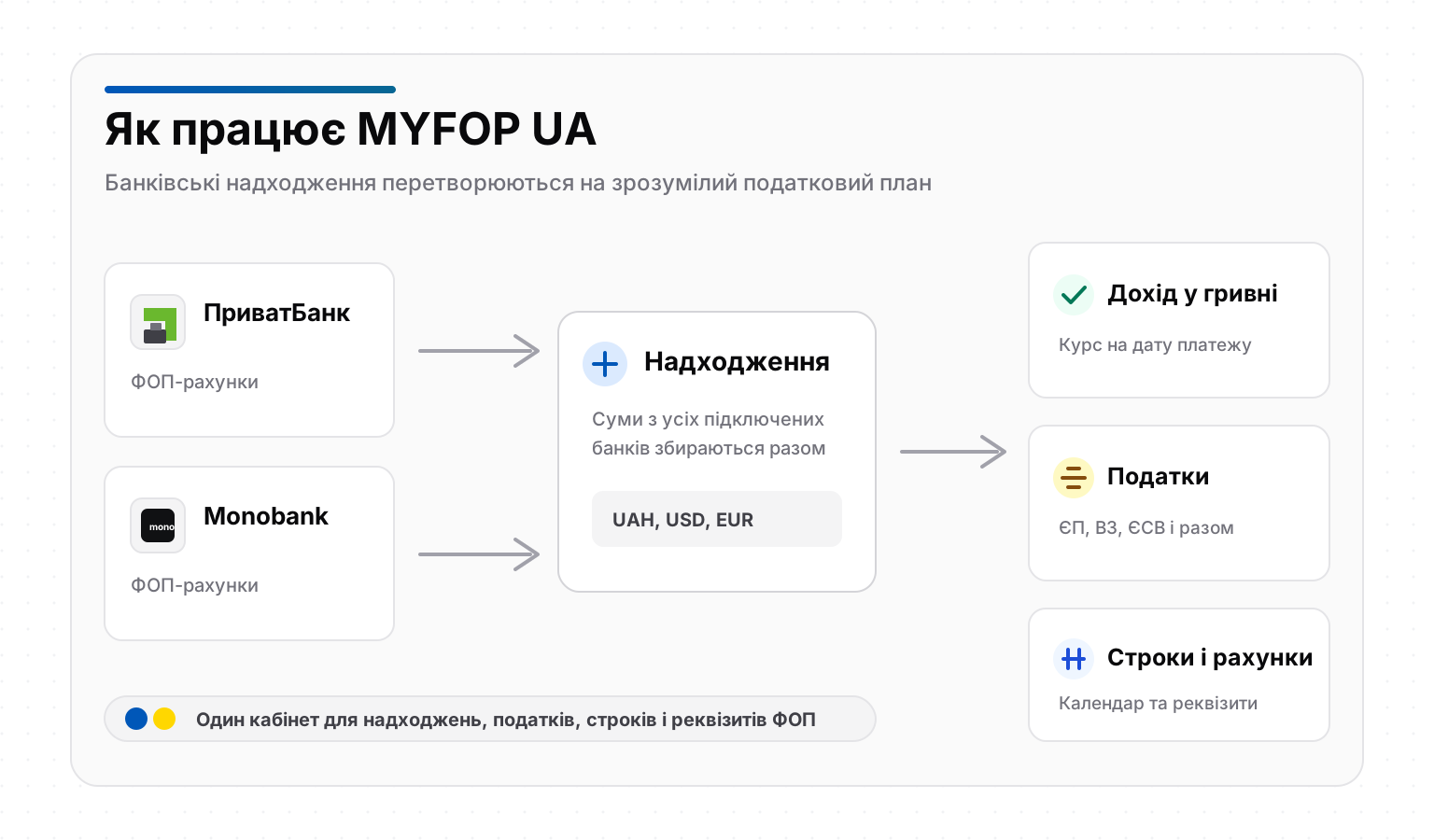
MYFOP UA collects income from connected banks and turns it into a clear tax action plan.
02
How work starts
After registration, the user connects a bank. MYFOP UA works with PrivatBank and Monobank, including the case where a FOP uses both banks at the same time.
Bank connection is used for reading business account statements, not for making payments. The service does not pay taxes on behalf of the user and does not perform payment actions in the bank. It collects incoming-payment data to prepare a clear calculation.
If one bank is connected, the workspace calculates based on that bank. If two banks are connected, MYFOP UA combines income into one total view and also shows the bank-by-bank breakdown.
03
How bank income is collected
After a bank is connected, MYFOP UA starts collecting statements for available periods. It receives recent income first and then gradually adds earlier periods when the bank provides them.
The workspace shows which periods are fully collected, what is still being collected, and which old periods the bank did not provide. This matters because banks may limit access to very old statements.
The user sees not only the transaction table but also a status for each bank. If the selected period is complete, it is visible right away. If data is still being added or part of the period is unavailable, the interface explains that too.
04
What becomes taxable income
For tax calculation, MYFOP UA uses incoming payments to connected FOP accounts. These payments form the income base for single tax and military levy.
If a FOP has accounts in several banks, the service combines income from all connected banks. Transfers between the user’s own connected FOP accounts should not increase income a second time, which helps avoid double-counting the same money.
Unusual operations, such as refunds, mistaken payments, or disputed income, should be checked separately. MYFOP UA shows the bank picture and tax estimate, but complex cases are still worth reviewing with an accountant.
05
How foreign-currency payments are calculated
If a payment arrives in UAH, it is included in UAH. If a payment arrives in USD, EUR, or another currency, MYFOP UA converts it to UAH using the exchange rate on the crediting date.
For foreign-currency payments, MYFOP UA uses the official NBU exchange rate on the date the funds are credited.
This is important for FOPs working with foreign clients. The relevant rate is not the rate on the day you open the workspace, not a monthly average, and not the rate at which you later sell currency. It is the rate on the date of the specific incoming payment.
06
How the tax calculation is formed
Once income is collected, the service groups it by quarters and calculates taxes. The table shows which quarter is being paid for, which income amount is included, and how much single tax, military levy, SSC, and total payment are due.
For completed quarters, MYFOP UA shows final amounts based on collected bank data. For the current quarter, amounts may be preliminary because the quarter is still open and new payments can change the calculation.
A detailed overview of rates, income limit, SSC, and payment deadlines is available in our article about .
What MYFOP UA brings into one calculation.
Block
What it shows
07
Tax calendar without confusion
MYFOP UA has a public with declaration, single tax, military levy, and SSC deadlines.
The calendar helps avoid mixing periods. In one quarter, a FOP may pay taxes for a previous reporting quarter, file a cumulative declaration, and have a separate SSC payment deadline.
That is why deadlines are shown next to the calculation, not as an abstract list of dates. The user sees what period the payment belongs to, when it is due, and what is already overdue.
08
Payment accounts by community
Another common FOP problem is using the right payment account. Details depend on the community and payment type, so a wrong account can create trouble even when the tax amount is correct.
Official payment details are also published in the Ukrainian tax service section «Рахунки для сплати платежів». But there, the user has to search manually and be careful not to mix up the community, tax, or account.
In MYFOP UA, this is automated for all communities: choose your community and see the relevant payment details for single tax, military levy, and SSC.
09
How the annual limit is tracked
A 3rd group FOP has an annual income limit. MYFOP UA shows how much of the limit has already been used during the current calendar year and how much remains.
This block does not depend on the period opened in the transaction table. Even when the user views the current month or quarter, the annual limit still shows the full current-year picture.
This is useful for entrepreneurs who are growing, receiving large foreign-currency payments, or working with income in several banks.
10
What the user sees in the workspace
MYFOP UA brings the key FOP information into one interface. There is no need to separately open a bank, spreadsheet, calendar, exchange-rate page, and payment-account directory.
The workspace shows total income, payment count, bank-by-bank breakdown, UAH equivalent for foreign-currency payments, quarterly tax calculation, data collection status, annual limit, deadlines, and payment accounts.
The main value is that the service does not merely show transactions. It turns bank income into a clear tax action plan.
PrivatBank, Monobank, or both banks connected
incoming payments collected from FOP accounts
foreign-currency income converted to UAH by payment date
11
What to remember
MYFOP UA helps automate the regular routine of a 3rd group FOP without VAT: collect income, calculate taxes, see deadlines, and find payment accounts. It does not replace professional tax advice in complex situations.
If there are unusual operations, refunds, tax-group changes, employees, VAT, or disputed payments, it is better to review those cases with an accountant.
For everyday FOP work, the service solves the main problem: it shows what happened with incoming money, which taxes follow from it, and what to do next.
12
FAQ
Can I connect PrivatBank and Monobank at the same time?
Yes. MYFOP UA supports both banks. If two banks are connected, the service shows total income and a breakdown by each bank.
Are foreign-currency payments included?
Yes. Foreign-currency payments are converted to UAH using the exchange rate on the crediting date.
Are transfers between my own FOP accounts counted twice?
If both banks are connected, the service can recognize transfers between the user’s own connected accounts to avoid counting the same amount twice.
Why can old periods be unavailable?
A bank may not provide very old statements. In this case, MYFOP UA shows which period is collected and which period is unavailable.